Ikonattos conversion tool
Keine Beschreibung verfügbar.
README
1) Get Ikonatto's conversion tool, you can find it within this archive...

2)Open mdsmx.cfg


	Use:

	MODE=1
	MDS=input/body.mds
	MDM=output/body.mdm
	MDMSOURCE=input/body.mdm
	REFERENCEMDM=ref/body.mdm


3)run mdsmx.exe
Now you have body.mdm in output directory , BUT tags will be badly rotated resulting in bad visual artifacts like displaced gun/head etc..
So we must continue

4)copy body.mdm from output to input
Get some body.mdm from pak0.pk3 (original ET mdm file, doesnt mind which character)
put it to ref directory

5) open mdsmx.cfg and change MODE to 4

6) run mdsmx.exe and then you will have correct MDM file in output, you can use it if you have permission, because it appears correctly in game..
You will also need to take care about head, but that is really diffirent story, unchanged RTCW heads will not do much problems if you dont use ET helmet or cap..

7) copy rtcw .skin files and rename them to following :
modelname_skinname.skin , where modelname will be model name ( duh!, but of course without extension ) and skinname will be same as field in character file ( by default these are : soldier, medic, engineer, fieldops, cvops ), you should copy in stuff from RTCW versions of this file, and also put there playerscale and desired amount after that ( 1.2 should be ok ), if there are some pathes to textures and they arent right change them.. ( this will happen if you use another folder )
Thanks to Ikonatto for this tool so you can concert your favourite MDS model to ET..
If you are able to change RTCW MDS models you can even alter ET ones..
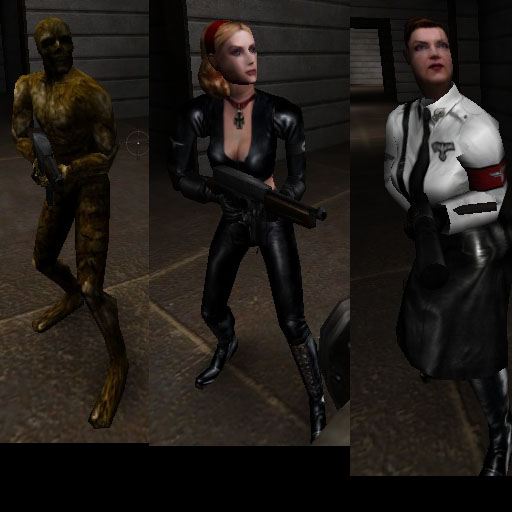
EDIT: Small example from light_test map

Those used edited head, you can do it in 3ds/gmax by importing standart ET head, and then rtcw head, delete ET head , keep only tag_mouth from it and delete tags from RTCW head, after that copy tag_mouth and attach head to it, this will make rtcw head somewhat animated, dont forget to rename head back to h_head and delete copied tag polygon
after that move original tag_mouth to be somewhere around neck or slightly under it
Export it and now ET cap/helmet should work
On those example characters i shoot all helmet stuff down to make it look more like originals..
Again thanks a ton to Ikonatto , and dont forget that this is licensed stuff...
Virus Scan
Clean — No threats detected
Scanned with ClamAV
File Contents
3 files
0.8 MB uncompressed
.zip (1)
.jpg (1)
.txt (1)
| File | Size |
|---|---|
| archives.zip | 755K |
| lighttest.jpg | 55K |
| readme.txt | 2K |
Comments (0)
Login um einen Kommentar zu schreiben.
File info
Rating
0.0
/5
0 Ratings
Detailed Rating
Design
0.0/5 (0)
Gameplay
0.0/5 (0)
Textures
0.0/5 (0)
Performance
0.0/5 (0)
Originality
0.0/5 (0)
