Tank prefabs
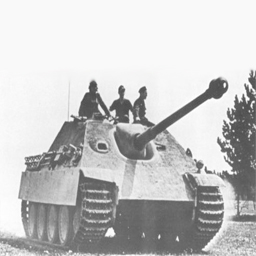
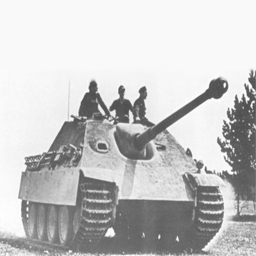
jagdpanther_damaged
3D Map Preview — BSP v46 WebGL
-- FPS
Loading jagdpanther_damaged.bsp
Initializing WebGL...
Powered by WOLFFILES.EU
Keine Beschreibung verfügbar.
README
 _______
|    ___|.-----.-----.--------.--.--.
|    ___||     |  -__|        |  |  |
|_______||__|__|_____|__|__|__|___  |
                              |_____|
 _______                   __ __
|_     _|.-----.----.----.|__|  |_.-----.----.--.--.
  |   |  |  -__|   _|   _||  |   _|  _  |   _|  |  |
  |___|  |_____|__| |__|  |__|____|_____|__| |___  |
                                             |_____|

			::::::::::: :::     ::::    ::: :::    :::
			    :+:   :+: :+:   :+:+:   :+: :+:   :+:
			    +:+  +:+   +:+  :+:+:+  +:+ +:+  +:+
			    +#+ +#++:++#++: +#+ +:+ +#+ +#++:++
			    +#+ +#+     +#+ +#+  +#+#+# +#+  +#+
			    #+# #+#     #+# #+#   #+#+# #+#   #+#
			    ### ###     ### ###    #### ###    ###
			:::::::::  :::::::::  :::::::::: ::::::::::   :::     :::::::::   ::::::::
			:+:    :+: :+:    :+: :+:        :+:        :+: :+:   :+:    :+: :+:    :+:
			+:+    +:+ +:+    +:+ +:+        +:+       +:+   +:+  +:+    +:+ +:+
			+#++:++#+  +#++:++#:  +#++:++#   :#::+::# +#++:++#++: +#++:++#+  +#++:++#++
			+#+        +#+    +#+ +#+        +#+      +#+     +#+ +#+    +#+        +#+
			#+#        #+#    #+# #+#        #+#      #+#     #+# #+#    #+# #+#    #+#
			###        ###    ### ########## ###      ###     ### #########   ########

									 _            __          __       ____        _ _
									| |           \ \        / /      |  _ \      | | |
									| |__  _   _   \ \  /\  / /__  ___| |_) |_   _| | |
									| '_ \| | | |   \ \/  \/ / _ \/ _ \  _ <| | | | | |
									| |_) | |_| |    \  /\  /  __/  __/ |_) | |_| | | |
									|_.__/ \__, |     \/  \/ \___|\___|____/ \__,_|_|_|
									        __/ |
									       |___/

:::Best viewed in 1024 x 768:::


	:::Getting Started:::

In this zip file you will find four pk3's:

 - churchill_damaged.pk3
 - churchill_repaired.pk3
 - jagdpanther_damaged.pk3
 - jagdpanther_repaired.pk3

Put all four of these pk3's into your Wolfenstein - Enemy Territory/etmain folder. When you have made your choice of what
tank you would like to use for you map, you can test to see if it really works by just opening Enemy Territory, open console
and type:

/devmap <name of pk3 here> for example
/devmap churchill_damaged

Or you could go to 'Host Game' and select the right map from the list, but you won't have cheats enabled this way.

When you open the prefered pk3 with a program like WinZip or Pakscape (I like the last one more) you will find the .map of
this tank prefab map. You can open this file with GTKRadiant and see how it looks like in the editor.


	:::How can I put this tank in my map:::

All you have to do is copy it and paste it into your map. You could of course select every brush that is part of the tank,
but you might miss some things so here is how I should do it:

 - open the .map in GTKRadiant
 - press I to select everything
 - now just deselect the six brushes that surround the map (skybox) and deselect the info_player_deathmatch,
   team_CTF_bluespawn, team_CTF_redspawn and the two team_WOLF_objectives. You can also deselect the script_multiplayer if
   you already have one in your map
 - press ctrl + C to copy the tank
 - open your map, you might want to do this in a second GTKRadiant so you can switch back easily if something goes wrong
 - press ctrl + V with the GTKRadiant with your map selected to paste the tank into the map
 - you might have to look around for it to find it first, but when you do you can just move it around the map and put it
   anywhere you want
 - put the info_train_spline_main entities on the right place (where you want them) and maybe add some more on the same way
   they are now. I believe you can have up to 512 info_train_spline_main entities
 - you are done with GTKRadiant for now, you will do the rest with scripting


	:::The Script:::

Before you start with this, it's advised to have a little bit of knowledge on scripting. I have added alot of comments to the
script so it is a bit more understandable, but it can't hurt to know a bit already, so I advise you to read this tutorial
from A to Z. It is made by Ifurita and all credits go to him:

http://4newbies.planetwolfenstein.gamespy.com/Map_Scripting_4_Newbies.pdf

First thing you have to do is take a look at the right script, if you want the tank jagdpanther_damaged, then you have to
take a look to the script jagdpanther_damaged.script. Read the comments carefully and take a look at all the linking between
script routines and sub-routines. You should be able to figure most things out and I can't really help you with this, this
is just something you have to understand and if you don't, you have to look closer.
If you think you understand most of it, simply copy and paste the Tank part into your script or if you don't have one yet,
just copy the entire script into a new notepad or wordpad or whatever texteditor you use to make your script. Add/change
things to your needs and keep hoping it will still work after you saved the script :-P and keep the Goldrush or Fueldump
script as an example.


	:::The Prefabs themselfves:::

The prefabs are just simple boxmaps with only the necessary entities to get the map working plus the tank and path where it
is all about. I haven't put any barriers in it and the stuff for the barriers isn't in the script, you will have to find out
yourself how to add them if you want them, I suggest you take Goldrush as an example again.

 - churchill_damaged.pk3 -
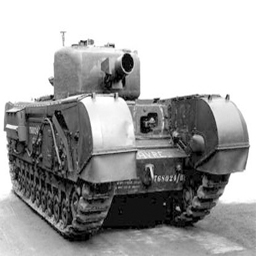
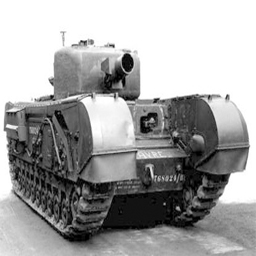
This is the churchill tank used in Fueldump, it is damaged at the start of the map. Allies have to repair it and escort it,
Axis have to damage it again.

 - churchill_repaired.pk3 -
This is the churchill tank used in Fueldump, it is repaired at the start of the map. Allies have to repair it and escort it,
Axis have to damage it again.

 - jagdpanther_damaged.pk3 -
This is the jagdpanther tank used in Goldrush, it is damaged at the start of the map. Allies have to repair it and escort it,
Axis have to damage it again.

 - jagdpanther_repaired.pk3 -
This is the jagdpanther tank used in Goldrush, it is repaired at the start of the map. Allies have to repair it and escort
it, Axis have to damage it again.


These prefabs are free to use for everyone as long as credit is being given to me, WeeBull. You might also want to thank
Sock and Digibob for making the Goldrush and Fueldump tanks.

Special thanks to:
 - Darth G, for making this all possible
 - EB, for teaching me alot of things about mapping
 - Sock, for making Fueldump and the tank
 - Digibob, for making the Goldrush tank

Please bare with me if you see any mistakes in my English, I'm from the Netherlands and English isn't my motherlanguage.

If you have any comments or if you would like to add/change something, please send me a pm on one of the following forums:
 - http://www.map-craft.com
 - http://www.splashdamage.com
 - http://www.enemy-territory.com
My username is WeeBull on all three.
Or you can send me an e-mail to the following adress:
 - [email protected]
You can also find me on #iZ.et on Quakenet sometimes, mostly known as wbl.

			 _______  _______  _______  ______     _                 _______  _
			(  ____ \(  ___  )(  ___  )(  __  \   ( \      |\     /|(  ____ \| \    /\
			| (    \/| (   ) || (   ) || (  \  )  | (      | )   ( || (    \/|  \  / /
			| |      | |   | || |   | || |   ) |  | |      | |   | || |      |  (_/ /
			| | ____ | |   | || |   | || |   | |  | |      | |   | || |      |   _ (
			| | \_  )| |   | || |   | || |   ) |  | |      | |   | || |      |  ( \ \
			| (___) || (___) || (___) || (__/  )  | (____/\| (___) || (____/\|  /  \ \
			(_______)(_______)(_______)(______/   (_______/(_______)(_______/|_/    \/
Virus Scan
Clean — No threats detected
Scanned with ClamAV
File Contents
6 files
0.3 MB uncompressed
1 BSP map: churchill_repaired
Type: wolfmp wolfsw wolflms
4 PK3 files
.pk3 (4)
.txt (2)
| File | Size |
|---|---|
| jagdpanther_damaged.pk3 | 76K |
| jagdpanther_repaired.pk3 | 77K |
| churchill_damaged.pk3 | 79K |
| churchill_repaired.pk3 | 79K |
| custom tank tut.txt | 11K |
| readme.txt | 8K |
Comments (0)
Login um einen Kommentar zu schreiben.
File info
Rating
0.0
/5
0 Ratings
Detailed Rating
Design
0.0/5 (0)
Gameplay
0.0/5 (0)
Textures
0.0/5 (0)
Performance
0.0/5 (0)
Originality
0.0/5 (0)